記數套裝 中文

No accounting background?
You can still keep the books

It lives in your own Google Sheet. Record money on a computer browser or on your phone. Click Export, and the reports are ready.

Try it free first: DM “記數” on IG / FB and we send the guide page and the trial copy link together. Up to 30 records, phone included.

Buy now use coupon LAUNCH388 for HK$388

Usual price HK$588 · one-off, no monthly fee · offer until 14 Dec 2026

What it is

  • A Google Sheets bookkeeping kit with a built-in helper for entering records and producing reports. Nothing to install — a free Google account is enough.
  • Record each time money comes in or goes out, on a computer browser or your phone. You can attach a photo of the receipt.
  • Click Export to get an Income Statement (how much you earned) and a Balance Sheet (what you have and what you owe) for your accountant. Everything stays in your own Google account.

Who it is for

Owners of Hong Kong limited companies and sole proprietors. You do not need an accounting background. Bookkeepers who help them can use it too.

Try it free, buy when you like it

  1. DM “記數”: we send the guide page and the trial copy link together. Click Make a copy and it is yours.
  2. Trial: up to 30 records: record money in / out, receipt photos, phone entry, the key numbers and the Setup wizard all work.
  3. Buy to unlock: after payment your Payhip email has a code. In the sheet click Accounting > Unlock full version and type it in. The reports are calculated at once and everything you recorded stays — no re-typing.

Not in the trial (opens after you buy): reports that show how much you earned, what you have and what you owe, bank statement upload and bank check, export to Excel / PDF.

How to use it (7 short steps)

The company and figures in the screenshots are fictional, for demonstration only.

Step 1

Open your link and click “Make a copy”

The trial link (sent by message) or your Payhip purchase email has a link. Click Make a copy, and the spreadsheet is saved in your own Google Drive. After that, only you can see your books.

Illustration only — the real wording may look slightly different.

Step 2

Open it in a computer browser and start setup

Open the sheet in Chrome or Safari on a computer. An “Accounting” menu appears at the top. Click Accounting > Start here, then fill in your company, year and accounts. The first time, Google will ask for permission — click Allow.

Illustration: this menu appears when you open the sheet in a computer browser. It does not appear in the Google Sheets phone app.

Step 3

Record a line on the computer

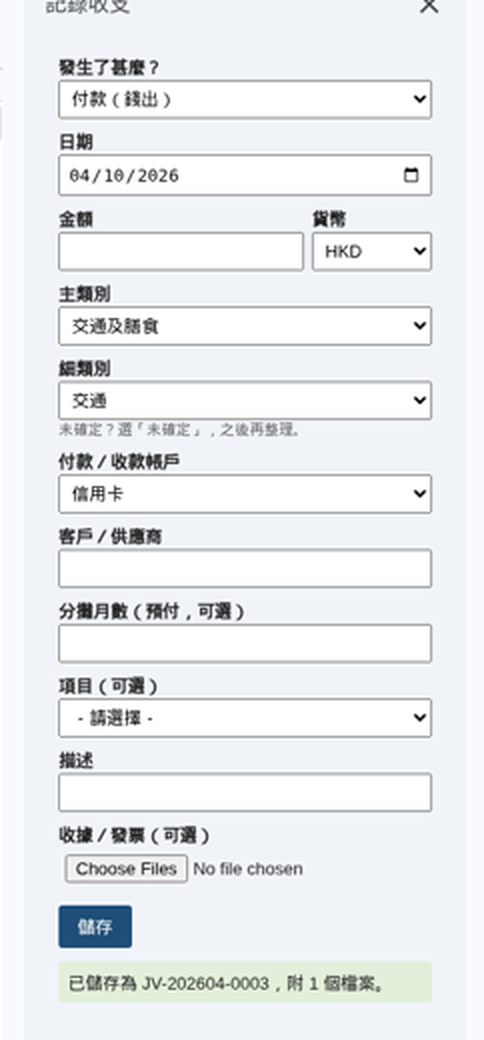
Click Accounting > Record money in / out. Choose money in or money out, enter the date and amount, pick a category, and attach a receipt if you have one. Click Save.

Desktop entry form: a payment saved as record JV-202604-0003 (demo)

Desktop entry screen (demo figures). The form itself is in Chinese in this screenshot; the English template has the same layout in English.

Step 4

Out and about? Record it on your phone

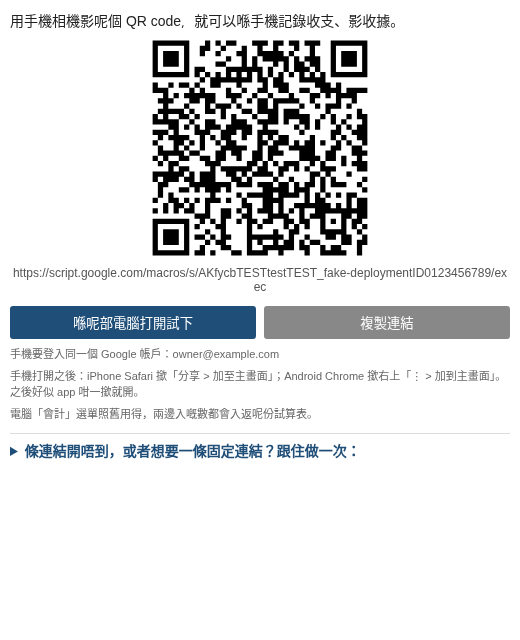
On the computer, click Accounting > Phone entry to see a QR code. Open it on your phone with the same Google account. You can add it to your home screen. (It is not a separate app.)

QR code dialog for phone entry (demo link)

The computer shows a QR code. Scan it to open the phone page.

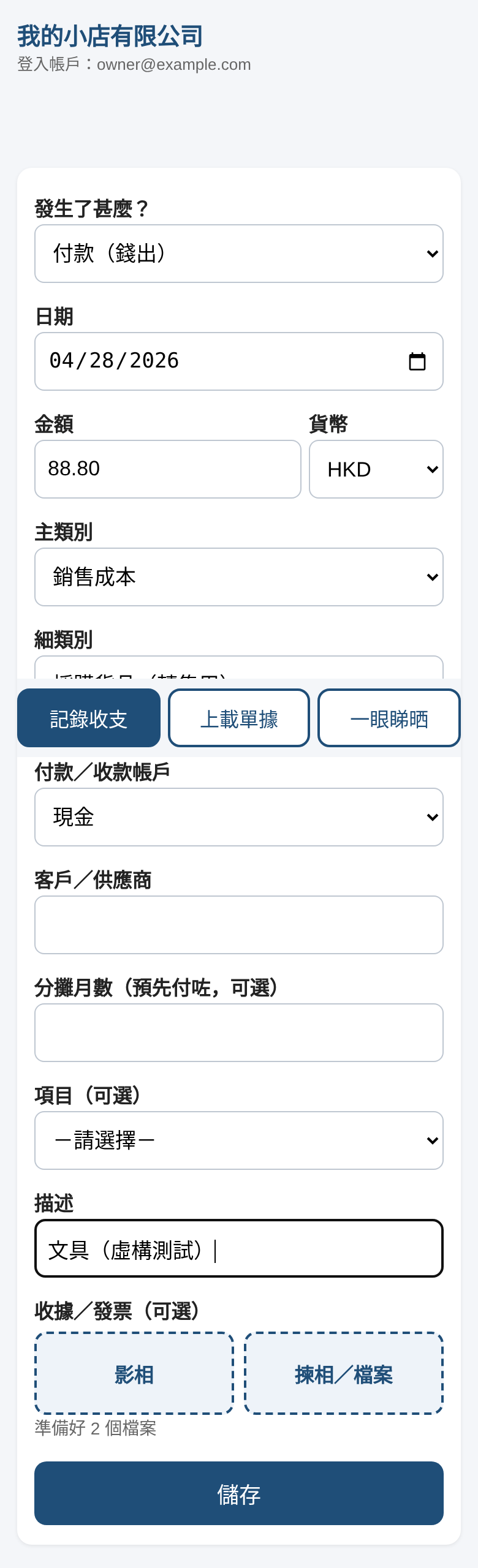
Phone entry page recording an HK$88.80 stationery payment (demo)

Record a line on your phone. The sign-in shown is owner@example.com, which is fictional.

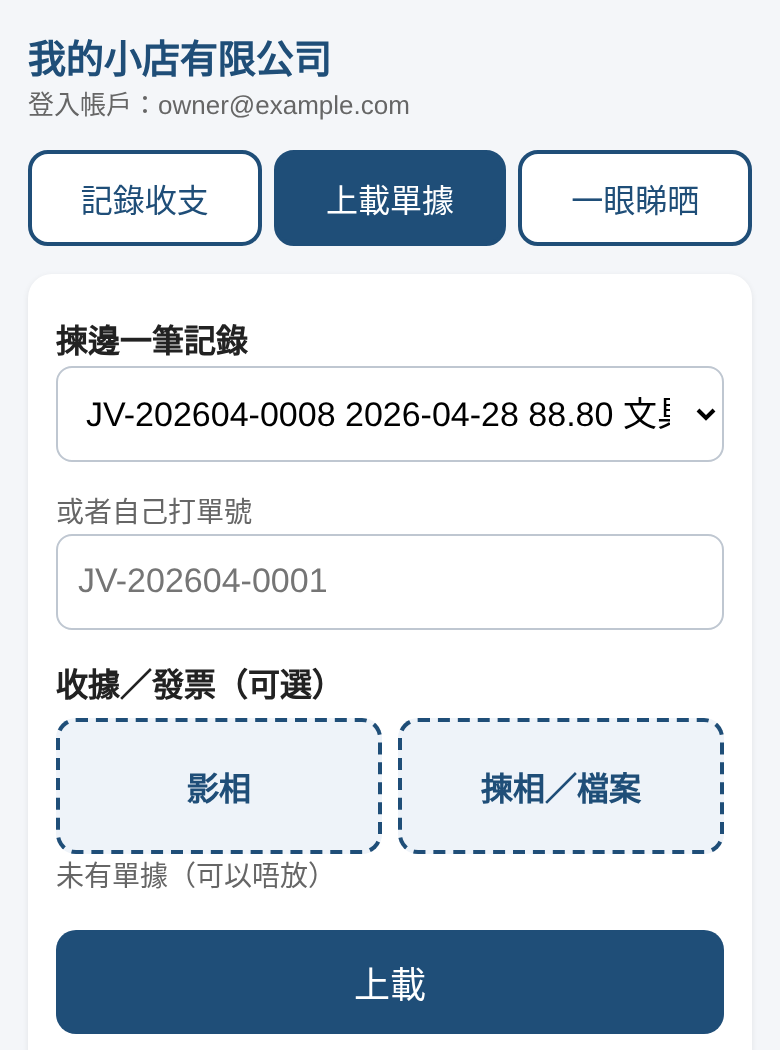
Phone page to attach a receipt photo (demo)

Take a photo of the receipt and save it with the record.

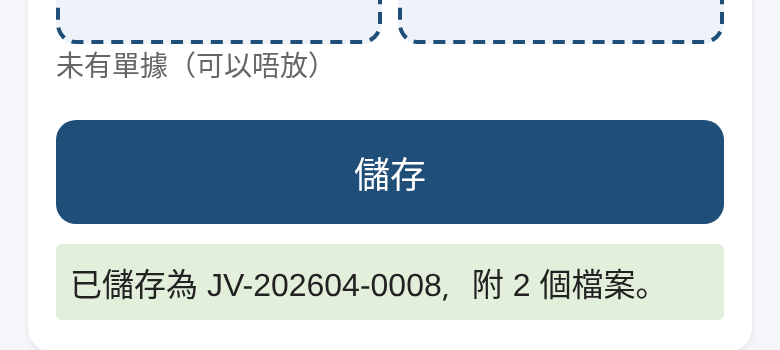
Saved as JV-202604-0008 with 2 files (demo)

After you save, you will see a record number.

Step 5

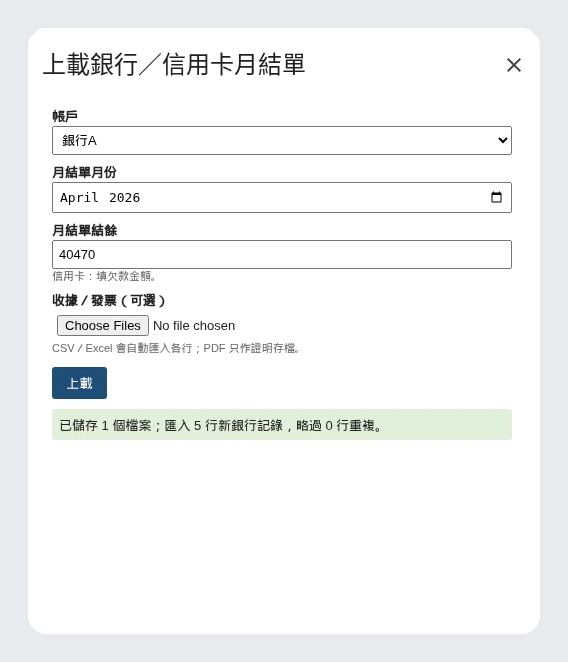
Upload a bank statement and check it against your records Full version

On the computer, use the menu to upload a statement. Pick the account and month, then upload the CSV or Excel file from your bank. It is matched to the records you have already entered. This step needs a computer.

Upload bank statement dialog: 5 new bank lines imported (demo)

Demo: after uploading the April statement, 5 lines were matched.

Step 6

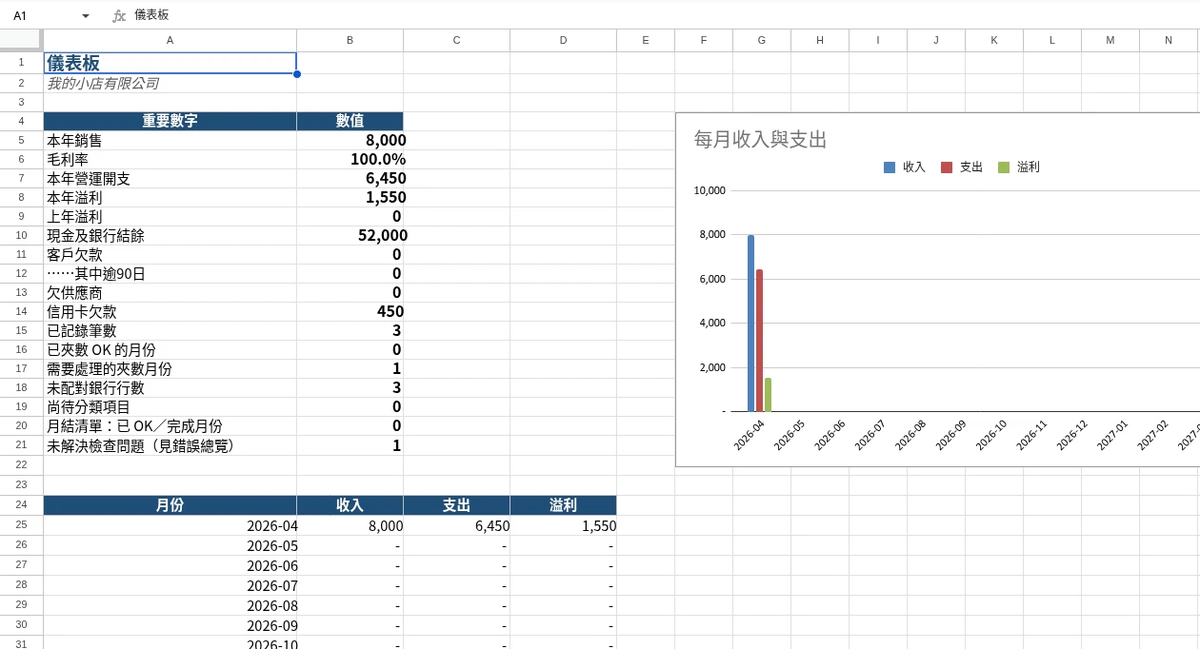
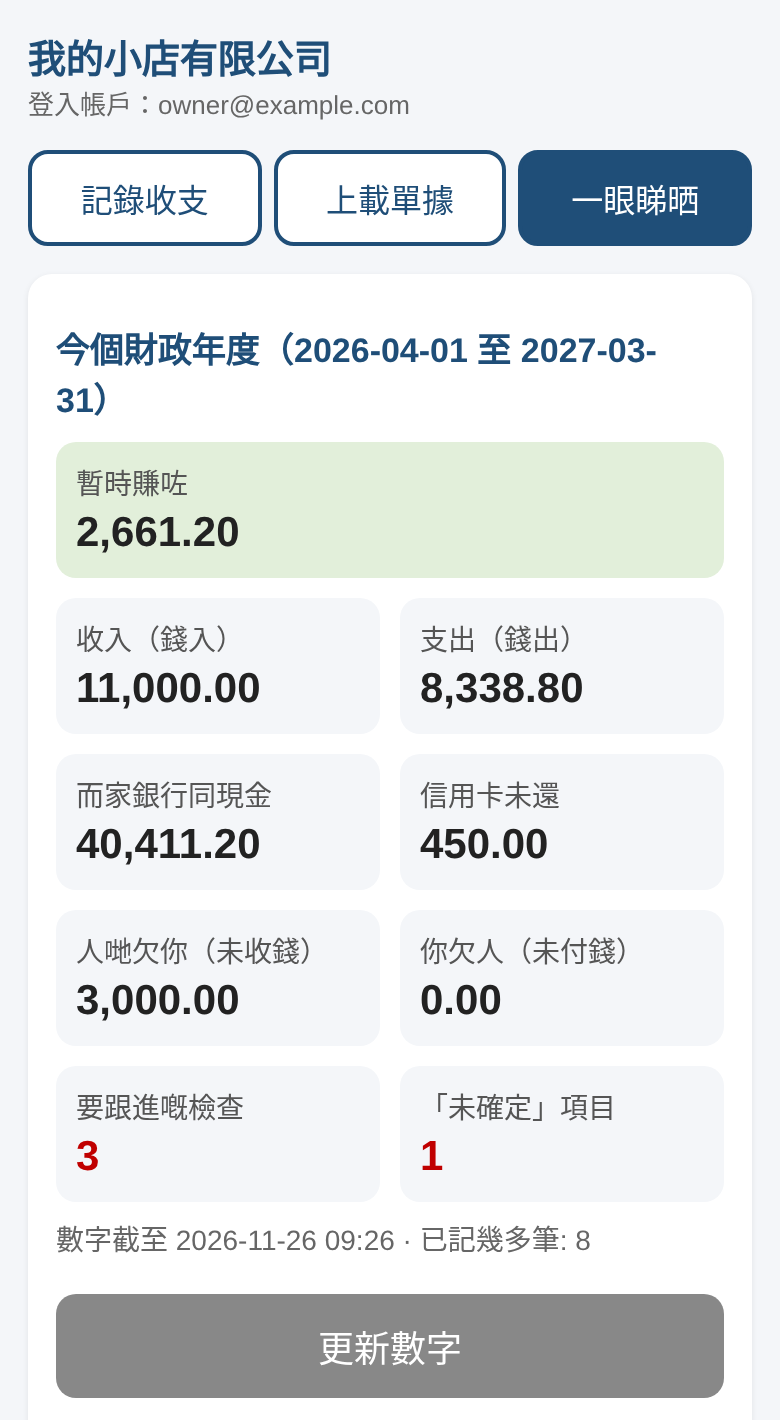
See the numbers at a glance

After you enter records, the numbers update. On a computer, open the dashboard. On your phone, tap the numbers tab (both in the trial too). Reports that show how much you earned, and what you have and owe, are calculated after you buy.

Dashboard for demo company My Little Shop Ltd: sales 8,000, profit 1,550

Computer dashboard (demo figures).

Phone summary showing profit so far of 2,661.20 (demo)

Phone summary (demo figures).

Step 7

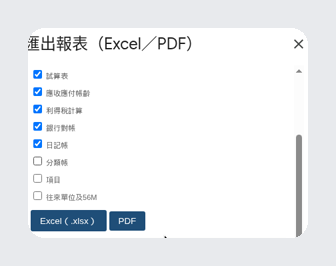
Click Export and send it to your accountant Full version

On the computer, click Accounting > Export reports, and choose Excel or PDF. The reports are already calculated. This step needs a computer.

Export reports dialog with Excel and PDF buttons

One click makes the file. Export needs a computer.
Price

HK$388
First 30: coupon LAUNCH388 usual price HK$588
  • One-off purchase — no monthly fee afterwards
  • Offer applies to the first 30 buyers, or until 14 Dec 2026, whichever comes first
  • One purchase covers one company and one spreadsheet
  • Traditional Chinese or English template
Buy now use coupon LAUNCH388 for HK$388
Try before you buy: a free trial (up to 30 records) — DM “記數” and you get the guide page plus the trial link. After you buy, type your code to unlock; everything you recorded in the trial stays.
Refund: Not happy within 7 days of buying? Full refund.

FAQ

Do I need to install any software?

No. A free Google account and a computer browser are enough. It works on Windows, Mac and Chromebook.

What are the limits of the free trial?

Up to 30 records. Recording money in / out, receipt photos, phone entry, the key numbers and the Setup wizard work. Reports that show how much you earned, what you have and what you owe, bank statement upload and bank check, and export open after you buy.

If I buy after the trial, do I have to type everything again?

No. Your Payhip email has a code. In the sheet click Accounting > Unlock full version and type it in. The same spreadsheet unlocks at once, the reports are calculated, and all your records stay.

How do I enter records on my phone?

In the trial and the full version, click Accounting > Phone entry on the computer, then scan the QR code on your phone. You can record money, attach a receipt photo, and see the key numbers. Checking against the bank and exporting need a computer.

Can the seller see my books?

No. Everything stays in your own Google account.

How many companies does one purchase cover?

One company and one spreadsheet. Another company needs another purchase.

Can I get a refund?

Yes. Not happy within 7 days of buying? Full refund. Email smartmayassistant@gmail.com or message us.

Ready? Place your order here

The button below takes you to payment. After you buy, your Payhip email has your code, the spreadsheet link and instructions. Already using the trial? Type the code into Accounting > Unlock full version.

Go to payment use coupon LAUNCH388 for HK$388

Usual price HK$588. First-30 offer until 14 Dec 2026. One-off purchase, no monthly fee.

First 30: coupon LAUNCH388 for HK$388
Free trial first · one-off
Buy now